Free Google Ads Looker Studio template
A five-page Google Ads report for Looker Studio (now Data Studio) that answers the questions clients and managers actually ask: where did the money go, what did it bring back, and what should we change next. It uses Google’s own Google Ads connector, so there is no connector subscription to pay for.
Data source: Google Ads (Google’s native connector — free, no third-party connector needed)
Open live demo Open template (then Make a copy)
Demo uses Google sample / demo-account data. After opening, use ⋮ → Make a copy to connect your own account.
What’s in the report
Page 1: Overview
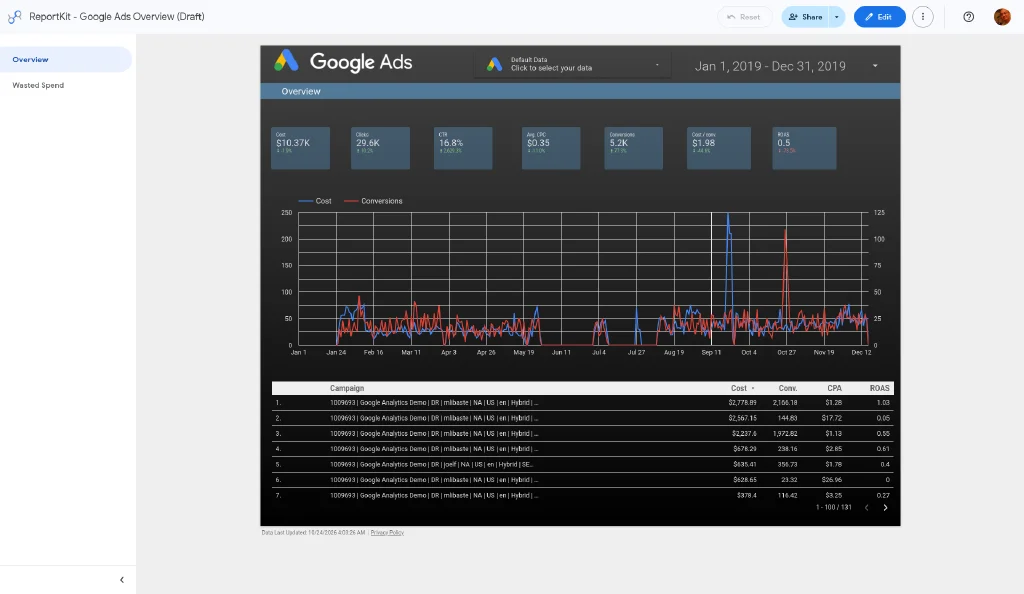
Eight scorecards compared with the previous period, cost vs conversions over time, and spend split by campaign type.
Fields: Cost, Impressions, Clicks, CTR, Avg. CPC, Conversions, Cost / conv., Conv. value / cost (ROAS)
Page 2: Campaigns
A heat-mapped campaign table showing which campaigns are limited by budget and which by ad rank.
Fields: Campaign, Campaign status, Cost, Clicks, CTR, Conversions, Cost / conv., Conv. value / cost, Search Impr. share, Search lost IS (budget), Search lost IS (rank)
Page 3: Wasted Spend
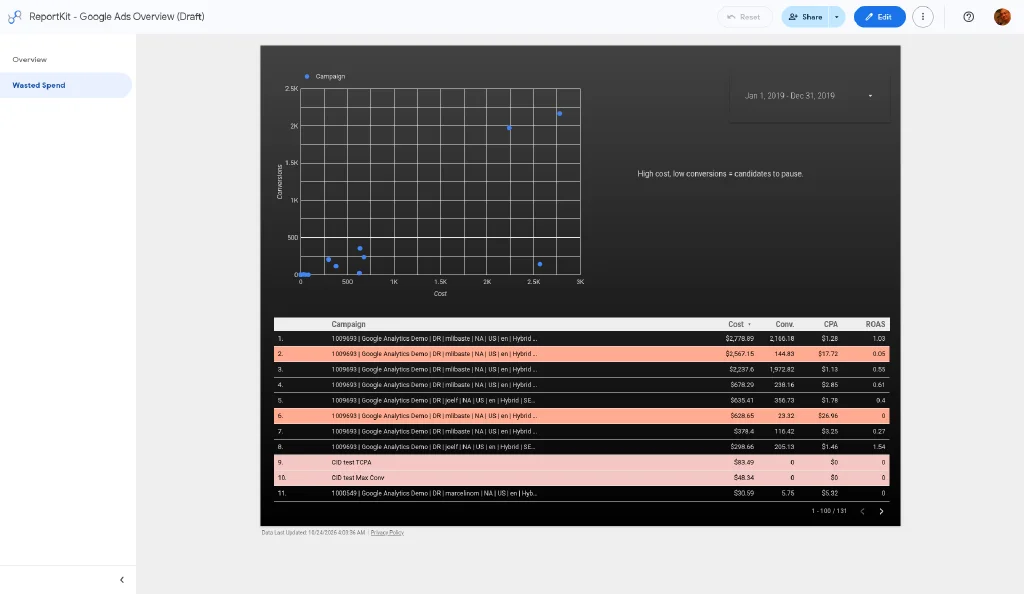
A cost vs conversions scatter chart (one dot per campaign) next to a campaign table with Cost, Conversions, CPA and ROAS. Rows with high cost and few or zero conversions are highlighted, so you can see which campaigns to pause, fix or cut back in seconds.
Fields: Campaign, Cost, Conversions, Cost / conv. (CPA), Conv. value / cost (ROAS)
Page 4: Keywords & search terms
Keyword and search term tables plus a cost-vs-conversions scatter chart to spot keywords that spend without converting.
Fields: Keyword, Keyword match type, Quality score, Search term, Clicks, Cost, Conversions
Page 5: Audience & device
Device split, a geo map and a day-of-week × hour heatmap of conversions for scheduling decisions.
Fields: Device, Country/Territory, City, Day of week, Hour of day, Conversions
Filters
Date range (default: last 28 days vs previous period), account (data control), advertising channel type, campaign, device
How to set it up (about 5 minutes)
- Open the live demo. It shows sample data.
- Use the account selector (data control) at the top of the report to switch to a Google Ads account you have access to. The whole report reloads with your numbers. Nothing is saved or shared.
- If it looks right, click ⋮ → Make a copy. When asked for a data source, pick or create a Google Ads data source for your account (Create → Data source → Google Ads → choose the account → Connect).
- Rename the copy, add your logo, and share it with your client or team. Choose owner’s or viewer’s credentials on the data source depending on who should see the data.
Need many accounts or white-label client reports?
The multi-client pack adds a roll-up across accounts, properties or sites, plus one white-label page per client. It costs $39 once, with a 14-day refund and no connector subscription.
FAQ
Is this Google Ads Looker Studio template really free?
Yes. The template is free and uses Google’s free native Google Ads connector. You don’t need a paid connector or an account with us.
Can I report on several Google Ads accounts?
The free template covers one account at a time (switch accounts with the data control). Google’s connector can also read a manager (MCC) account with up to 50 sub-accounts per data source. A ready-made roll-up across accounts and white-label client pages are in the paid multi-client pack.
Why don’t my numbers match the Google Ads UI exactly?
Check that the date range, time zone, and conversion columns match. “Conversions” in Google Ads only includes conversion actions set as primary, while “All conv.” includes all of them. Recent days can also change as conversions are attributed.
Does it work with Performance Max?
Campaign-level metrics for Performance Max show on the Overview and Campaigns pages. Keyword and search term pages only apply to campaigns that have keywords.
Is it still Looker Studio or Data Studio?
Google renamed Looker Studio back to Data Studio in 2026. The product, connectors and templates work the same, so this template works under either name.
Get the template link by email
Placeholder form (mailto to oooliver.wang@gmail.com). Set FORM_EMBED_URL in src/config.js before launch.